

Memory Error
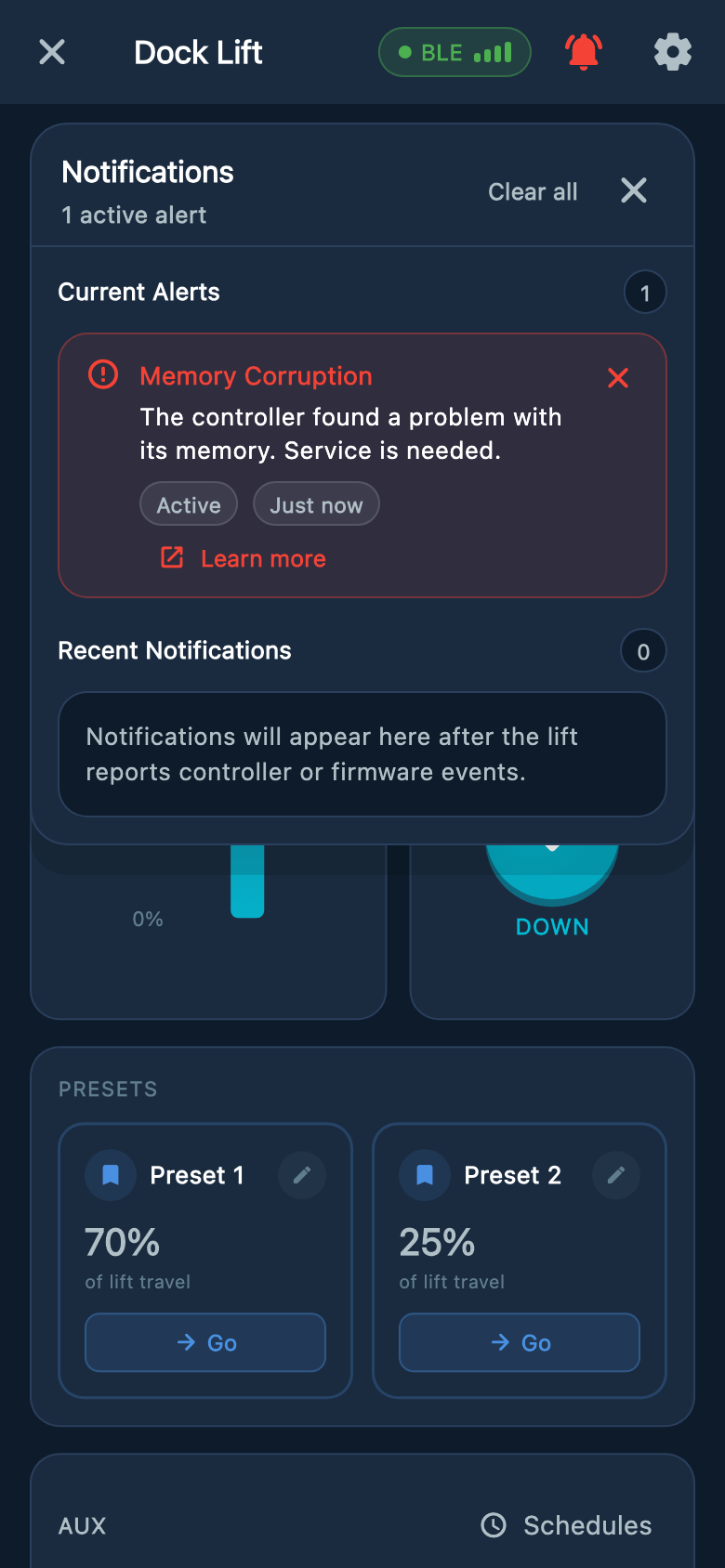
The controller cannot verify its saved settings. Atlantis Boater may call this warning Memory Corruption. Stop using the lift and contact Atlantis Support or your dealer.
Safety first
The controls may still move the lift
Turn the key OFF if your lift has a key switch, and tell other users to leave the lift out of use. Do not test movement or assume that a warning locks every control.
What to do now
- 1
Record the message
Take a screenshot of the Memory Corruption warning and a photo of the controller label. Include both software versions if they are available in Lift & Device Info: Lift Controller Firmware and App Bridge Firmware.
- 2
Look only from outside
Note any water, corrosion, heat damage, or recent storm damage. Do not open the controller or touch wiring.
- 3
Contact Support
Send the serial number, screenshots, and when the warning appeared. Mention any recent outage, storm, or service work.
Example screens from Atlantis Boater. Names, device details, and settings are samples.
Select an image to enlarge it.
Leave repair and settings to Support
- Do not factory reset the controller, restore old settings, or repeatedly turn the power off and on.
- Do not change saved positions, stopping points, or sensor settings.
- On a lift with APS, saved stopping points may be unavailable and movement may be limited to short held-button steps. This is not normal operation.
- Keep the lift out of use even if the message disappears, until Support or your dealer confirms it is ready.
Was this article helpful?
Tell us whether this answered your question.