

Guided Wi-Fi setup
Wi-Fi Setup
Use Atlantis Boater to connect a supported controller to Wi-Fi or update its saved network.
Prepare
Before you start
- Stand near the controller with Atlantis Boater open and signed in. Your phone needs internet for account setup and shared-lift access checks.
- Have a 2.4 GHz Wi-Fi network and password available. The controller must be able to reach the internet for remote access.
- Keep the lift stopped and make sure no one is near the boat or moving equipment.
- Enable Bluetooth and requested nearby-device permissions. Marina renters cannot change the controller’s Wi-Fi; contact marina staff for a network change.
 Enlarge photo
Physical setup control
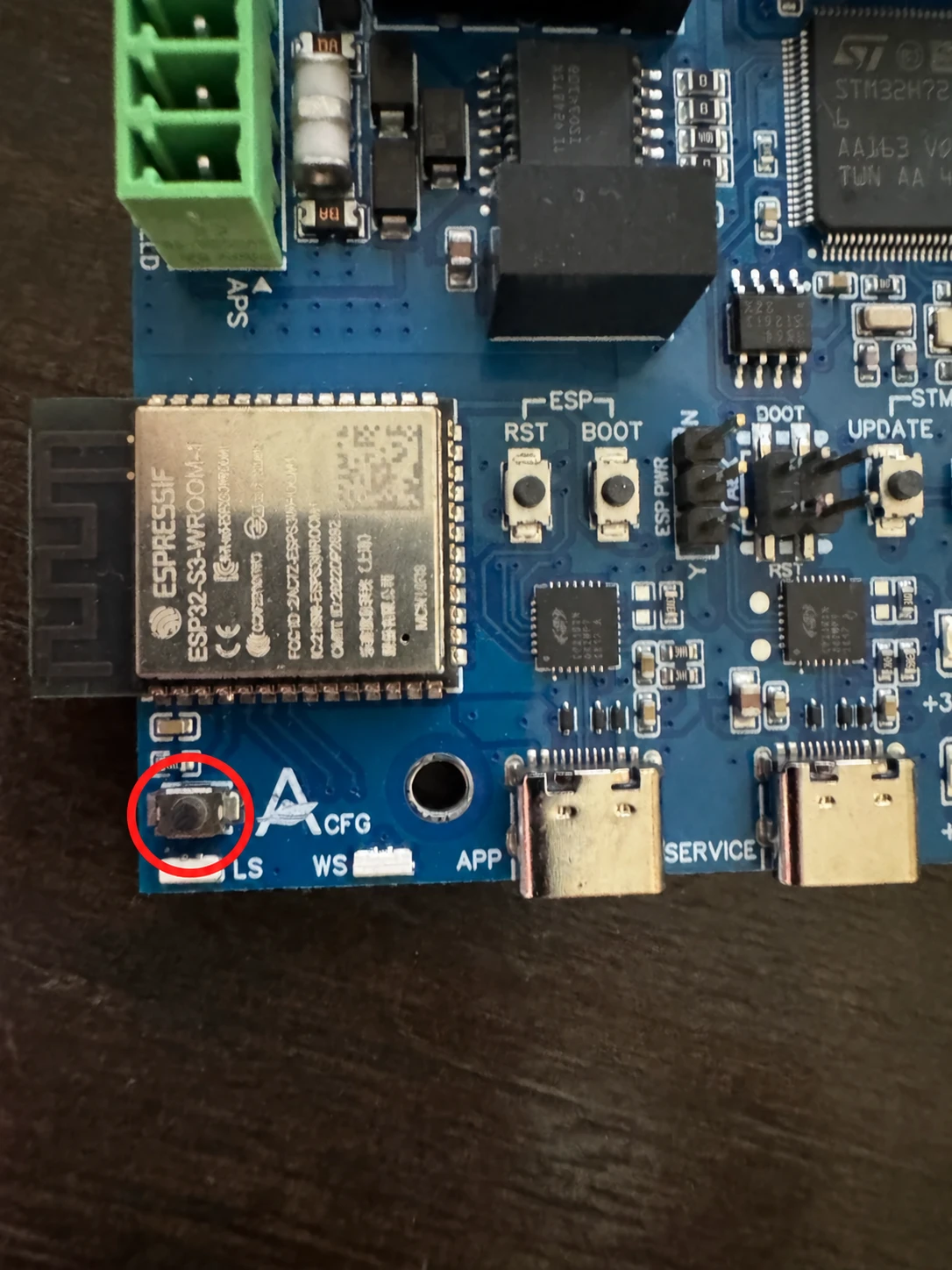
Find the APP setup button
Keep the enclosure closed. Do not reach inside to press a button. If you cannot access the setup button safely from outside, ask your installer for help.
Stop the lift and keep everyone clear. Only when Atlantis Boater reports that Bluetooth setup is locked, hold this button and watch the separate wireless light. Release as soon as it flashes magenta once and sounds a short high chirp—about five seconds. This clears the lock caused by repeated failed setup attempts. It keeps the lift connected to its existing owner account and does not reset Wi-Fi.
One magenta blink
Release now. Bluetooth setup is unlocked. The existing owner and Wi-Fi settings stay unchanged.
Two magenta blinks
You have held too long. Release immediately; this is a warning only.
Solid magenta for five seconds
This light is used during an account reset. Wait for the final app result. After a personal lift is reset, its owner must add it to an account again before Bluetooth control works. A marina lift stays under marina management; contact marina staff to restore access. The five-second light is different from the five-second APP unlock hold. Never use an account reset to fix Wi-Fi.
Connect
Connect with Atlantis Boater
- 01
Connect nearby
Sign in to Atlantis Boater, enable Bluetooth and requested nearby-device permissions, and stand near the stopped lift. Match the serial number to the outside label.
- 02
Open Wi-Fi settings
For a lift already in your account, select it and choose Open Lift Control. Connect over Bluetooth, tap the gear icon (Lift & Device Info), then find WiFi and choose Update WiFi Settings. If your access does not include Wi-Fi settings, contact the owner or marina. For your own newly installed lift, use Add a Lift instead.
- 03
Choose the network
Choose your 2.4 GHz Wi-Fi network and enter its password. Use Scan Nearby to refresh the list, or Manual to type the network name. Then choose Update WiFi. When adding your own personal lift for the first time, Enable WiFi is optional: Add Lift saves your choice. Marina setup requires Wi-Fi and must be completed by authorized staff.
- 04
Wait for confirmation
Keep your phone nearby and leave the app open until setup finishes. Connecting to the router is one step; the lift also needs to connect to Atlantis for online features.
- 05
Check the result
Check the final app message. Nearby Bluetooth control does not require a remote-access subscription. Remote access needs internet and an active plan or access provided by your marina. If setup fails, take a screenshot of the message for Support.
Example screens from Atlantis Boater. Names, device details, and settings are samples.
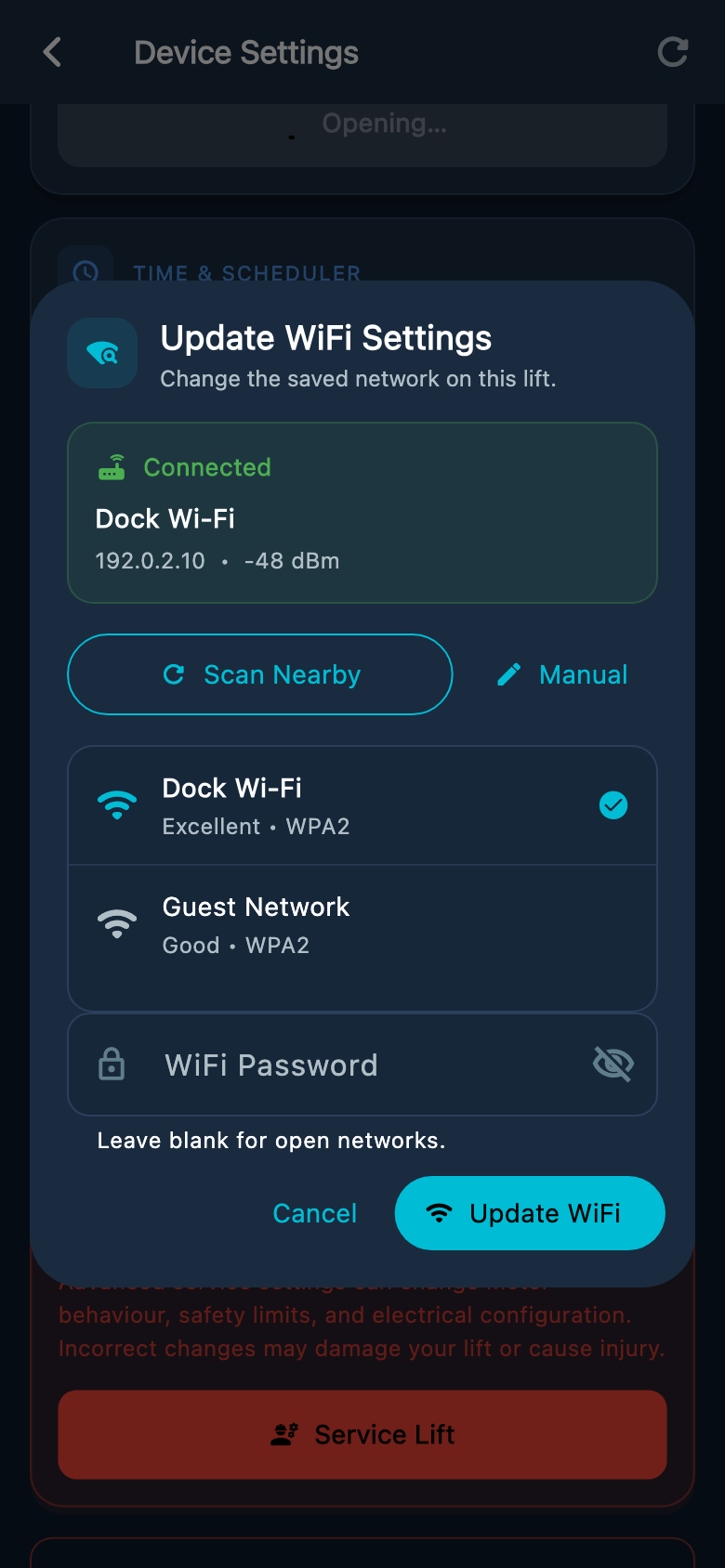
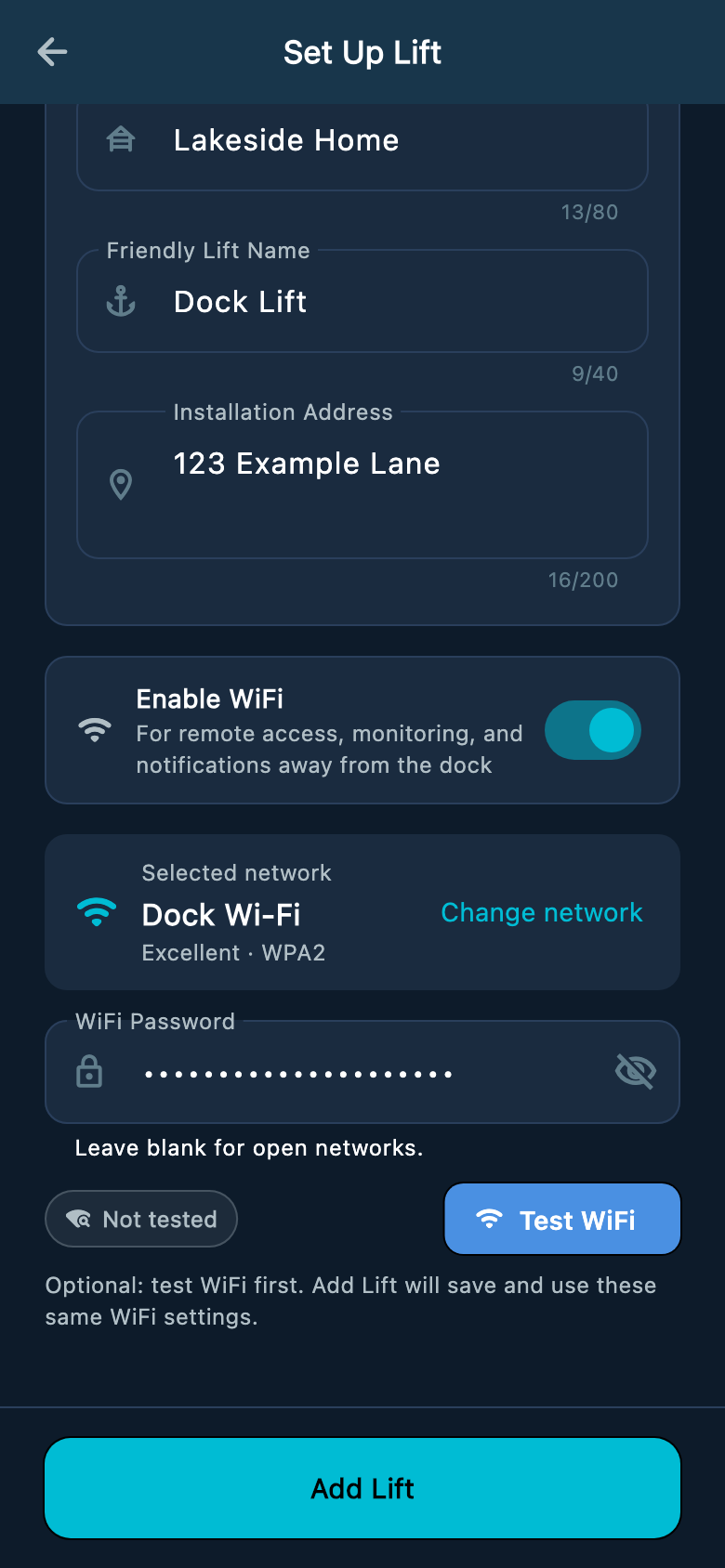
Select an image to enlarge it.
Setup did not finish
Stop and get help
Do not repeat the APP hold, continue past the first magenta blink, or change installer settings. Record the app message and any visible light color or rhythm, then contact your dealer or Atlantis Support.
Verify
Wireless light quick reference
Use the separate wireless light for connection information. It can flash several colors while setup is in progress. Wait for the final app message before deciding whether setup succeeded. Alternating red/magenta means setup failed. A brief green flash alone does not confirm remote access is ready.
- White breathing
- Ready to be added to an account; Wi-Fi may already be connected
- Cyan breathing
- Linked to an account; remote app access is not ready
- Alternating amber/white
- Online account setup could not finish. Read the app message and contact Support if it continues.
- Yellow breathing
- Saved Wi-Fi is enabled but not connected
- Blue fast blink
- Searching for Wi-Fi or processing setup
- Blue breathing
- Connecting to Wi-Fi or waiting for its network address
- Purple triple flash
- The new Wi-Fi network and password were saved. Wait for setup to finish
- Cyan flash
- The controller clock was updated automatically
- Cyan / white alternating
- Finishing online setup and checking account access
- Blue / cyan alternating
- Establishing the server connection
- Amber double flash
- Server connection failed and is retrying
- Red / white alternating
- The lift controller is not responding to the wireless module
- Solid green
- Remote app connection ready with a strong Wi-Fi signal
- Green breathing
- Remote app connection ready with a weaker Wi-Fi signal
- Orange slow blink
- Remote app connection ready, but Wi-Fi signal is very weak
- Red double blink
- Wi-Fi connection attempt failed
- Red slow blink
- Wi-Fi disconnected
- Solid red
- Bluetooth setup is locked after five failed setup attempts. This warning blocks new Bluetooth setup. Nearby controls may still work if no fault or lock prevents movement. Hold the APP button for five seconds to clear it.
- Magenta ×1 + high chirp
- Bluetooth setup unlocked after a five-second hold; release the button
- Magenta ×2
- Ten-second hold reminder; release to avoid a longer reset gesture
- Solid magenta for five seconds
- An account reset was accepted. Follow the app and contact the owner or marina
Was this article helpful?
Tell us whether this answered your question.