

X4.4 Controller Identification
Find the serial number, hardware version, and software versions for your X4.4 controller without opening the enclosure.
Important guidance
Have your controller details ready
The current controller is X4.4. These details help Atlantis Support identify your lift and review a service or warranty request. Read labels from outside the closed enclosure.
Find the details in Atlantis Boater
- 1
Open Device Settings
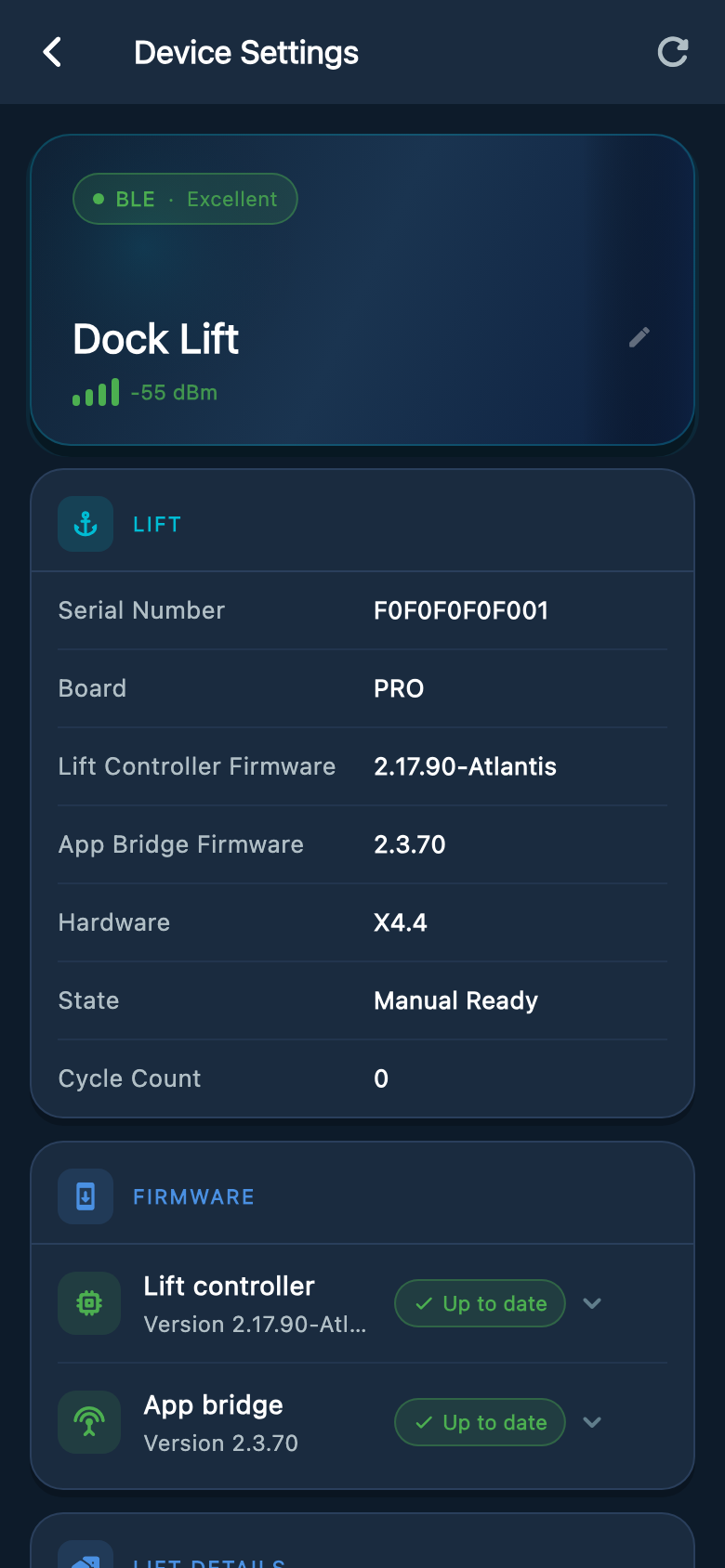
From My Lifts, select your lift and choose Open Lift Control. Tap the gear icon marked Lift & Device Info. The screen that opens is titled Device Settings.
- 2
Record the controller information
Take a screenshot showing the serial number and Hardware row in the Lift card. Record Lift Controller Firmware and App Bridge Firmware from the same screen.
Example screens from Atlantis Boater. Names, device details, and settings are samples.
Select an image to enlarge it.
If the app reports a problem
- For Memory Corruption, keep the lift out of use and follow the Memory Error guide below. Support will determine whether repair or warranty service is needed.
- For Hardware version not set, use the app’s Contact Atlantis Support action. Send the message and any controller details that are available; you do not need to diagnose the cause.
- If the app cannot connect, photograph the outside controller label and describe the lights or message you can see.
Prepare the support request
- Controller serial number and proof of purchase
- A clear photo of the controller label
- A screenshot of the Device Settings screen, opened with the Lift & Device Info gear icon, showing the Hardware line
- The lift location and installer or dealer contact, when available
Was this article helpful?
Tell us whether this answered your question.